We provide premium cPanel hosting!
  • Contact
  • View Cart (0)
  • Client Area
FSG TECH logo
Our Clients
Knowledgebase
  • Domains
    Register Domain
    Your very own website address
    Transfer Domain
    Move your domain to FSG TECH

    Hundreds of customer's around the world trust FSG TECH to manage their domain. We provide freedom and control including full access & the ability to move/sell your domains.

  • Web Hosting
    Cloud Hosting
    High Speed Managed Hosting
    Rapid SSL® Certificate
    Rapid SSL® Certificate
    Weebly Website Builder
    Building a Website Has Never Been Easier
    Premium
    Premium
    Internet Infrastructure S&P
    Servers & Protocols
    Marketing Platform® for Small Business
    Marketing Platform® for Small Business
    McAfee® Total Protection 2022
    McAfee® Total Protection 2022
    NordVPN
    Secure & Protect Your Web Browsing

    We provide a wide range of services for your business including Web Hosting, Dedicated Servers, VPNs & more.

  • Extras

    Enhance your website with these extras including our website backup & security services.

  • Company
    Company
    Learn more about FSG TECH
    Why Choose Us
    The reasons why to choose us
    Testimonials
    Lots of feedback from our customer's
    Affiliate Program
    Make money with FSG TECH
    Announcements
    Get up to date with the latest news
    Downloads
    View our collection of downloads

    Learn more about what makes FSG TECH the best choice for web hosting services.

  • Addons
    WHMCS Templates
    The best web hosting templates
    WordPress Themes
    Feature-rich WordPress themes
    HTML Templates
    Responsive HTML5 Templates
    Blesta Templates
    Blesta web hosting templates
    Clientexec Templates
    Powerful templates for Clientexec
    WHMCS Modules
    Enhance your WHMCS system
    Scripts
    Menus, feature boxes & tables
    Logo Design
    Custom vector logo design service
    Banner Design
    Custom animated banner design
    WHMCS Services
    Setup, configuration & custom services
    WordPress Services
    Installation, integration & more
    Blesta Services
    Installation, integration & more
    Clientexec Services
    Installation, integration & more

    Launch your business with our range of website templates and related services.

  • Support
    Contact Form
    Contact our pre-sales department
    Submit Ticket
    Contact our support via ticket
    Knowledgebase
    View our vast documentation

    If you have a pre-sale question or issue with your website we are here to help.

  • Order

Knowledgebase

Portal Home > Knowledgebase > Virtualizor > Virtualizor VPS Management > How to Start/Boot Your VPS Using Virtualizor?

  Categories

Backup/Restore
4
Cloudflare (cPanel)
9
CloudLinux (cPanel)
10
cPanel - Control Panel
24
Databases
11
DirectAdmin
48
DNS - Nameservers
6
Domain Management
10
Email
17
FTP
9
Installing a Control Panel
6
Mail Filters & SPAM
8
Mobile
11
Others
3
PayPal
7
Plesk
47
Security
10
SiteWorx (Control Panel)
61
Softaculous
76
SolusVM
18
SSL
5
Virtualizor
19
WHM
18
WordPress
17

  Categories

  Support

My Support Tickets
Announcements
Knowledgebase
Downloads
Network Status
Open Ticket

How to Start/Boot Your VPS Using Virtualizor? Print

  • 0


If your VPS is down/offline, you can start it using Virtualizor.


1. Log in to your Virtualizor Control Panel.

2. In the left side panel, click on List VPS.
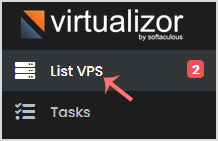
Virtualizor-list-vps-menu.gif


3. Hover your mouse on the appropriate VPS, and that line will be highlighted. Then click on the Manage icon in the highlighted line.

Virtualizor-click-manage-vps.gif


4. On the top right side, click on the Start icon.

Virtualizor-start-vps-icon.gif


It can take a few minutes for your VPS to start.



Was this answer helpful?

Related Articles

How to Reboot/Restart Your VPS using Virtualizor?   If you want to restart your VPS, you can do it via the command line or Virtualizor.   How to... How to Shut Down Your VPS Forcefully or Gracefully via Virtualizor?   You can shut down your VPS in two ways - forcefully or gracefully, using Virtualizor.   How... How to Access Your VPS via VNC in Virtualizor?   You can access your VPS via VNC in case of an emergency, such as when a firewall blocks your... How to Reinstall OS using Virtualizor Automatic OS-Reinstaller?   You can easily Install/Reinstall the operating system using the Virtualizor. However, note... How to Change Hostname from Virtualizor?   You can change the hostname from Virtualizor.   1. Log in to your Virtualizor Control Panel....
« Back

  Support

My Support Tickets
Announcements
Knowledgebase
Downloads
Network Status
Open Ticket
FSG TECH Partners
728+ people trust FSG TECH
Join them today
Services
  • Cloud Hosting
  • Rapid SSL® Certificate
  • Weebly Website Builder
  • Premium
  • Internet Infrastructure S&P
  • Marketing Platform® for Small Business
  • McAfee® Total Protection 2022
  • NordVPN
Extras
Domains
  • Register Domain
  • Transfer Domain
Addons
  • WHMCS Templates
  • WordPress Themes
  • HTML Templates
  • Blesta Templates
  • Clientexec Templates
  • WISECP Templates
  • HostBill Templates
  • WHMCS Modules
  • Scripts
  • Logo Design
  • Banner Design
  • WHMCS Services
  • WordPress Services
  • Blesta Services
  • Clientexec Services
Company
  • Company
  • Why Choose Us
  • Testimonials
  • Affiliate Program
  • Announcements
  • Downloads
Support
  • Contact Form
  • Submit Ticket
  • Knowledgebase
About FSG TECH
FSG TECH provide premium web hosting, domain registration & security services to businesses around the world.more
7901 4th ST N STE 300 St.Petersburg, FL 33702
sales@fsgtechtv.com
+01 888 403 7488
Company Number: 7832763
VAT Number: FR197763863
Follow FSG TECH
FSG TECH Facebook
FSG TECH Twitter
FSG TECH YouTube
FSG TECH Google
FSG TECH Instagram
FSG TECH Skype
FSG TECH GitHub
FSG TECH LinkedIn
FSG TECH reddit
FSG TECH WhatsApp
FSG TECH discord
FSG TECH © 2026 | All rights reserved
  • WHMCS Templates
  • Terms Of Service
  • Acceptable Usage Policy
  • Privacy Policy
PayPal logo
Credit Card logo
RapidSSL logo

Loading...
Loading...

Generate Password

Please enter a number between 8 and 64 for the password length
FSG TECH Facebook
FSG TECH Twitter
FSG TECH YouTube
FSG TECH Google
FSG TECH Telegram
FSG TECH discord